
All packages in one place
Everyone has their own rhythm and schedule. And packages rarely arrive at exactly the same time. Fortunately, you don't have to stay home for them when you have them delivered to a DHL Locker or DHL ServicePoint. You just go your own way and pick up your packages whenever suits you.

How to set your delivery preference?
We explain step by step how to set your delivery preference in the My DHL app.
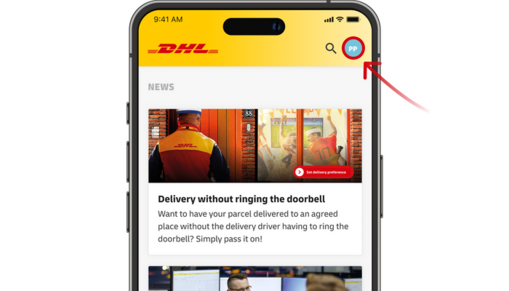
Set your delivery preference
Step 1
Open the My DHL app and click on your initials in the right upper corner.
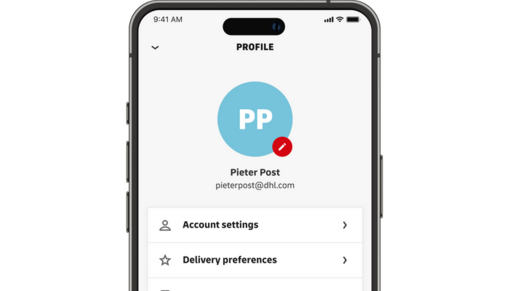
Set your delivery preference
Step 2
Click on "Delivery Preferences".
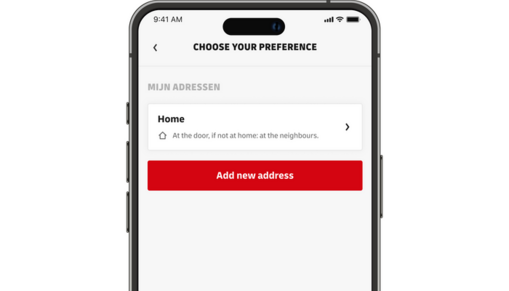
Set your delivery preference
Step 3
On this screen you can choose your delivery preference. What will it be? Your doorstep, directly around your house or one of those convenient DHL Lockers or DHL ServicePoints? The choice is yours! You can always change your preference per expected parcel.
Ship and return using a DHL Locker
Sending and returning parcels is easy with a DHL Locker. Just make sure your parcel has a shipping or return label. Don't have a return label? Create one online and print it, or choose the 'Download QR code' option to send your parcel without printing a label. It's that easy!

Returning is easy
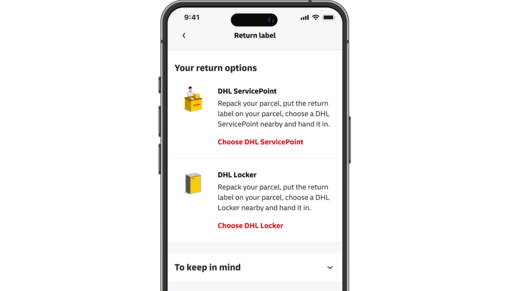
Returning your parcel is now even easier with the instructions in the My DHL app. You'll find the available return options under each delivered parcel. There are three possibilities:
- You received a return label in the box or by email: drop off your parcel at a DHL ServicePoint or DHL Locker.
- You received a QR code by email: drop off your parcel at a DHL ServicePoint or DHL Locker.
- You didn't receive a return label or QR code: please contact the sender.

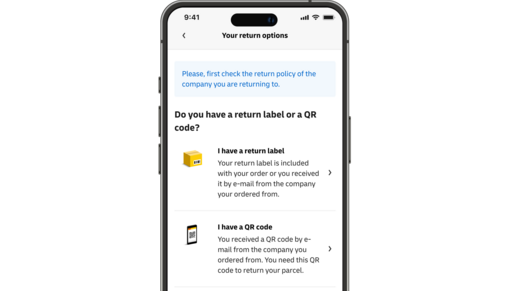
Step 2
In the My DHL app
Select an option.
Step 3
In the My DHL app
Depending on your selection, bring your package to the appropriate location.
Pack and Go
With the holidays just around the corner, of course you want every gift to arrive safely. So you pack a fragile package differently than a book - that goes without saying. We give you packing tips: use a customized box, avoid loose parts and protect fragile items with soft material. This way you ensure safe and careful shipping and your packages will arrive unscathed! Want to be on the safe side? Insure your package.

Efficient customer service via chat
Bought something from an online store and don't know where your package is? Tracy, our chatbot, offers quick and 24/7 help. Using the track and trace number, she knows where your package is. For complex questions, you will be directed to our live chat during business hours.
Are you expecting a package from a Chinese webshop like Shein, Temu or AliExpress? Then Tracy cannot help you and we advise you to contact the webshop itself.
